
Download All2Txt – Text Extraction, File Conversion, PDF to Text, DOC to Text, Batch Conversion, Multilingual Text
Overview
All2Txt is a productivity-focused utility designed to extract plain text from a broad range of file formats, including PDF, Word, PowerPoint, Excel, RTF, HTML, and HLP files. The application eliminates the need for Adobe Acrobat or Microsoft Office, enabling users to parse documents natively without external dependencies. This makes it particularly valuable for professionals, researchers, students, and content managers who frequently handle document conversion tasks. By supporting multiple file types across various versions, All2Txt serves as a lightweight alternative for users seeking efficient text extraction without the overhead of full-featured office suites. The tool is especially useful in environments where software licensing is restricted or where rapid access to textual content is essential. Real-world applications include digitizing archived documents, preparing data for analysis, extracting metadata, or creating searchable text archives. In the broader app ecosystem, All2Txt fills a niche for specialized file processing tools that prioritize speed, compatibility, and independence. Its ability to operate without third-party software enhances security and reduces system resource usage. The developer did not provide additional technical details about the development background or roadmap. However, the app’s core functionality suggests a focus on performance and usability for everyday file conversion needs.Key Features & Functionality
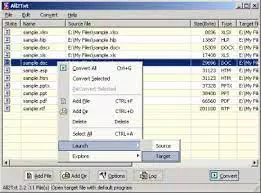
All2Txt offers a suite of robust features tailored for efficient and accurate document parsing. The application supports independent file parsing, meaning it processes files directly without relying on Adobe Acrobat, Microsoft Office, or other third-party tools. This ensures faster processing and avoids compatibility issues tied to external software. It supports a wide range of formats, including Office files from Office 95 to 2007 and Office Open XML, as well as PDFs from version 1.0 to 1.7. This extensive compatibility allows seamless conversion across legacy and modern file types. A standout capability is batch conversion, which enables users to process multiple files simultaneously—ideal for handling large volumes of documents in a single operation. Users can customize output settings, such as selecting specific sections of a document, choosing encoding formats (including Unicode), and defining output destinations. This flexibility ensures optimal results for diverse use cases, from multilingual content extraction to data preprocessing. The tool also includes intuitive drag-and-drop and copy-paste functionality for quick file and folder selection. For advanced users, a command-line version is available, allowing integration into automated scripts and workflows. These features collectively enhance productivity, reduce manual effort, and support efficient text extraction across different professional and academic environments.Real-World Use Cases
- Digitizing scanned documents or legacy files for archival and searchability.
- Extracting text from research papers, reports, or presentations for analysis or citation.
- Converting bulk office files into plain text for indexing in databases or content management systems.
- Preparing multilingual documents for translation or language processing tasks.
- Automating document processing in scripts or batch workflows using the command-line interface.
Interface, UX & Performance
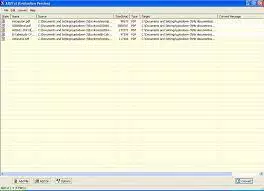
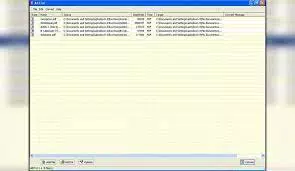
All2Txt features a clean, user-friendly interface designed for straightforward operation. The layout emphasizes accessibility, with clearly labeled options for file selection, conversion settings, and output configuration. Navigation is intuitive, allowing users to load files via drag-and-drop or standard file dialogs. The visual style is minimalistic, focusing on functionality rather than decorative elements, which contributes to a distraction-free experience. Users can quickly configure batch processing parameters and monitor conversion progress in real time. Although the developer did not list formal performance metrics, the application is described as having high processing speed, particularly when handling multiple files simultaneously. The tool maintains responsiveness during batch operations, suggesting efficient memory and CPU utilization. Stability appears to be a priority, with no reported issues related to crashes or data corruption. Compatibility information was not fully disclosed, but the app is designed for Windows 10 and newer versions. The developer did not specify minimum OS requirements, nor did they provide details on device performance across different hardware tiers. Nonetheless, the 10.5 MB file size indicates a lightweight footprint, which supports smooth operation on systems with limited resources.Platform Compatibility & Technical Requirements
All2Txt is available exclusively for the Windows platform. It requires Windows 10 or a newer operating system version, though specific OS requirements were not listed in detail. The application has a file size of 10.5 MB, making it a compact utility suitable for quick installation and minimal storage usage. The app is offered at no cost, with a free pricing model. The software version is 1.0.0, indicating a stable initial release. No additional system requirements, such as RAM, processor speed, or GPU specifications, were provided. The developer did not disclose compatibility with older Windows versions or alternative operating systems like macOS or Linux. As such, users on non-Windows platforms will not be able to access the tool. The absence of mobile or web-based versions suggests that All2Txt is intended for desktop-based workflows.Pros and Cons
- Independent file parsing eliminates dependency on Adobe Acrobat or Microsoft Office.
- Supports a wide variety of file formats across multiple versions.
- Efficient batch conversion for processing multiple files at once.
- Flexible output options including encoding, section selection, and file destination.
- Lightweight size (10.5 MB) ensures fast installation and minimal resource usage.
- Command-line version available for automation and integration into scripts.
- Unicode support enables accurate multilingual text extraction.
- Only available for Windows, limiting accessibility for macOS and Linux users.
- No mobile or web version currently available.
- Specific performance benchmarks or system requirements were not disclosed.
- Limited information on update frequency or future development plans.
- Not compatible with older Windows versions beyond Windows 10.
FAQ
Is All2Txt safe to download and use?
All2Txt is a free utility designed for text extraction and file conversion. It does not require administrative privileges or third-party software. The developer has not provided information about digital signing or antivirus verification, but the app’s small size and lack of intrusive behavior suggest it is secure for standard use.
Can I use All2Txt on macOS or Linux?
Currently, All2Txt is only available for Windows. The developer did not indicate plans for macOS or Linux support. Users on non-Windows platforms will not be able to install or run the application.
Does All2Txt support older file versions?
Yes. All2Txt supports Office files from Office 95 to 2007 and Office Open XML, as well as PDFs from version 1.0 to 1.7. This ensures compatibility with legacy documents commonly found in archival or enterprise environments.
Can I convert files in bulk using All2Txt?
Yes. The application supports batch conversion, allowing users to process multiple files simultaneously. This feature is ideal for handling large sets of documents efficiently, reducing manual effort and time.
Is there a command-line version for automation?
Yes. All2Txt includes a command-line interface, enabling advanced users to integrate the tool into automated workflows, scripts, or scheduled tasks for repetitive file conversion processes.


